Tag: technology

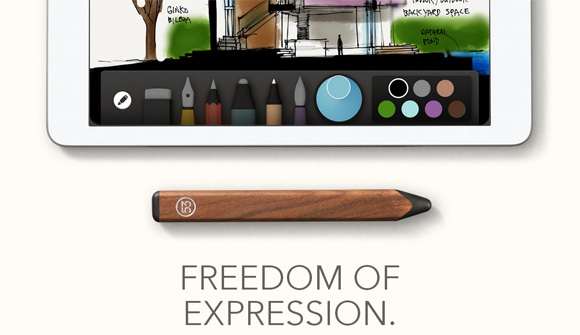
  • FiftyThree: Pencil | Think with your Hands

    fiftythree-pencil-think-with-your-hands

    This is a thing of beauty. Too bad I don’t use iPads… and I don’t know any of my friends who use them, except for my aunties. And for a possible new option, I was looking at the Nokia phones, but someone told me Samsung’s are resilient. Survived a massive rain, they said. Not that it rains much down here.

    FiftyThree has designed this stylus pencil [that comes in walnut and graphite] that is actually pretty cheap. Between the prices of $60-$50 USD. It’s good for sketching, outlining, writing, coloring and blending- it does seem to do basically the same as a Galaxy Note, which my cousin (and a friend) loves to use, but I guess the iPad gives you greater space to work. Plus, I suppose the stylus would be more sensitive, or am I wrong?

    Check out the video.


  • On Online Mind Maps

    I haven’t worked with mind maps since my school days were over. I remember I used to work with FreeMind, but it’s been so long since then that I wondered whether there were any good web-based mind-mapping applications around today. I found two slightly different ones that I tested working on a mind map of my Indian Movie-watching Journey [1].

    First, there was MindMeister, which worked the most similar to FreeMind. The free version seems to be bare, it doesn’t allow you to save styles (for formatting) or setup your share options — smart~ — it just goes from ‘private’ to ‘public’ … or you have to invite people, which should work for most. But it works and it lets you save your work, export in different sizes and formats, so it’s all good.

    indian-movie-journey-jul-nov-2013

    (more…)


  • Yahoo! JP: Hands On Search

    3D printers keep popping up in news. This time around with Yahoo! Japan developing a fancy module that includes a 3D printer that fuses the visual experience of searching for information with the tactile results of 3D printing for children who have sight impediments.

    It’s called Hands on Search (さわれる検索), also read as Sawareru Kensaku.

    More info on the Sawareru website.


  • Ghost: New Blogging Platform

    ghost-blog-platform-dashboard

    The latest blogging revolution is coming?

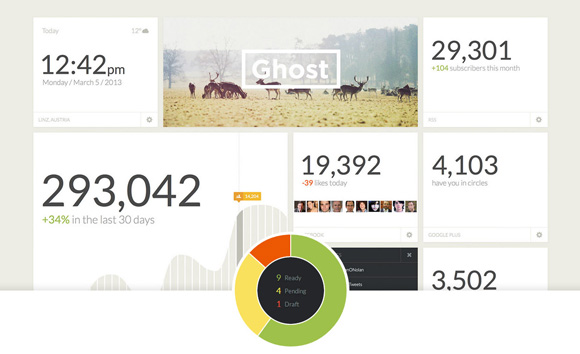
    Though it seems, somehow, that the people at WordPress want to turn itself into “an operating system,” — I can’t really see how, coz I don’t use WordPress for anything else other than blog — some very smart and all tech-wiz group of people have put together a blogging platform they’ve named Ghost. The biggest change is the way they handle your data dashboard.

    They recently completed a successful Kickstarter campaign, and for 10 pounds you could get a digital download of Ghost (I suppose for install?), though the video to promote the project and some of the benefits of the campaign make it seem like you can also sign up for usernames (like WordPress.com?). Some of the stats displayed on the dashboard seems to suggest some time of system connectivity.

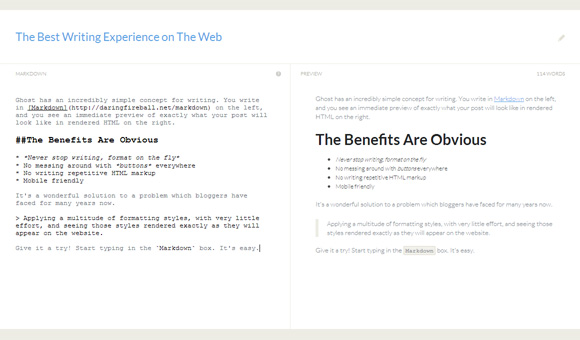
    The other exciting aspect is its Markdown feature. The video makes it really really appealing to see how you can do almost magic to format and make your post pretty.

    ghost-blog-platform-markdown

    Of course, there’s also theme customization and the way it handles data, it seems that Ghost will work out across platforms and layouts. Flip it, turn it — just basic fluid design. Front-end and back-end. It seems that Ghost will let you work on post through your tiny mobile devices quite flawlessly, which isn’t one of WordPress strongest features. Then again, I hate having to whip something out on a smartphone or tablet.

    You can check the Ghost features on their site, though it’s not yet available.


  • Optimus Maximus Keyboard

    optimus-maximus-keyboard

    My main grip about Korean is that if I wanted to type it, I had to customize my keyboard so I knew which syllable was in which position, instead of typing gibberish the first time I tried to use it. LOL The same thing is happening with me and Russian. Every time I try to type something, I have to press every single key because I can’t find them. xD

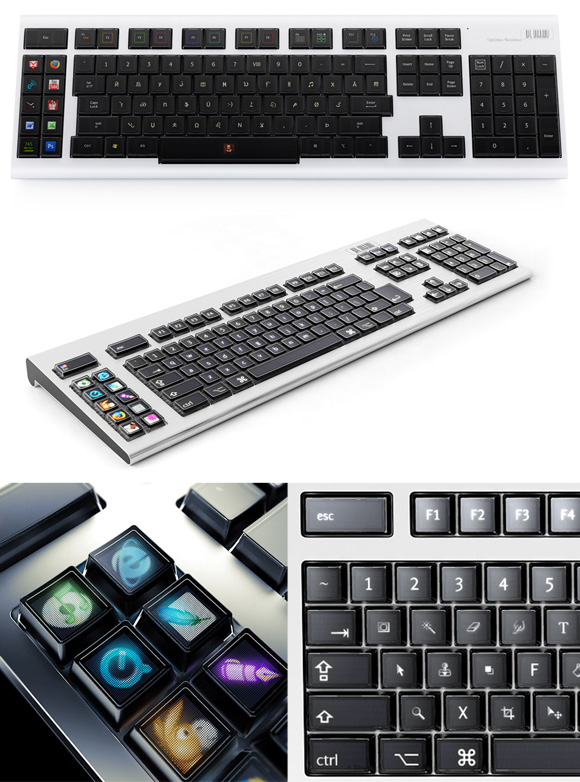
    So I was looking for a LED-based keyboard that would do just that. Change layout every time I would switch keyboard settings on my computer. And Apparently I wasn’t the only person in need of one (and I’m too late to the party). Someone pointed me towards Art. Lebedev Studio, who happened to be a studio based in Moscow, Kiev and New York.

    Because only non-English speakers, or multilingual people would need to come up with this sort of gadget. The concept was solid, and apparently all the keyboards are sold-out, even though the “popularis” version (so the compact one) is priced at 797 Euros or $1086 USD. xD

    The concept for the Tactus one looks cool, though, I’ve never warmed up to digital displays in the form of typing devices. I HATE typing on smartphones and tablets.


  • Vending Machine Touch Screen

    I haven’t bought anything on a vending machine in a VERY long time, unless you count the times I’ve used machines that dispense train tickets — and that would probably be twice in a little more than a year.

    So this video of a vending machine in Japan using a Touch Screen is very interesting to me. Is there a practical reason they would need to switch regular vending machines to these touch screens? I can’t think of any reason at the moment, then again- it’s nearly 5am. This sort of posting always happens at this time of night/morning.


  • Nokia Lumia 920 Windows Phone

    One of the most tiring things on technology blogs is to read comments from people. It’s been specially tiring when Apple fans start blasting Samsung/Android posts, and viceversa. Though I must admit The Next Big Thing Commercial [1] was pretty funny. However, there was always something in common for the both of them, they could piss on Nokia.

    Well, Nokia won’t stand for it no longer!

    And their commercial speaks the truth.


  • Tokyo City Symphony

    Mori Now Building Group is celebrating ten years of something, so they’ve opened a website called Tokyo City Symphony where you’d be able to experience Tokyo at a 1:1000 scale 3D map projection.

    It’s pretty darn visually impressive.


  • Paper Documents to Go Interactive

    For a few couple of years already, people have been calling on the death of printed paper. And in all honesty, I rarely print stuff for myself — a vast majority of printed documents refer to letterhead letters, which I usually just send on PDF by email. But if I’m printing something, it’s got something to do with branded documentation.

    We’ve talked about e-paper [1], digital newspapers, and Samsung’s flexible screens [1] are coming. People are supposedly using smartphones and are all over iPads, as sales for PCs are down dramatically as times flies by. Yet, people apparently still print stuff. At least that’s the premise for this project:

    For a long time, people have been playing around with interactive tables [1][2][3][4][5], though I don’t know anyone who can afford one. The guys from Fujitsu Laboratories seem to be aiming at consumer-range products. And though it may sound and look cool that you can turn all your printed documents into something digital and interact with it, wouldn’t it mean that your page with video included has already been digitally design?

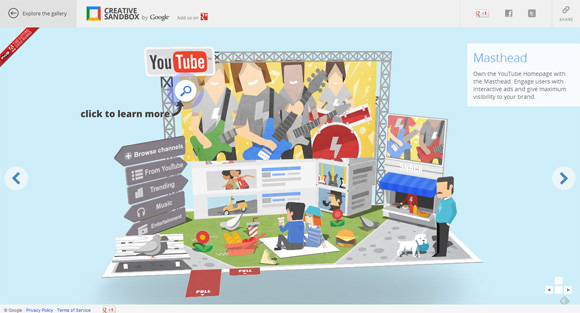
    There’s digital pop-up books!

    creative-sandbox

    Of course, there ARE elements in our everyday life that aren’t digital — doodled post-it notes (I can’t think of anything else other than notes). The rest, they wouldn’t have been embedded elements on your digital source document. The question is, why print it?


  • Google Street View Hyperlapse with +labs

    There’s some stunning views on this hyperlapse video using Teehan+Lax technology

    You can check more info and get the source code on their Vimeo page.